Partitioning is worthwhile when it removes work from frequent queries or makes retention and updates manageable. Begin with the filters actually submitted, the volume per candidate partition, and the distribution of updates. A date column alone is insufficient evidence for daily partitions.
Distinguish four physical units
| Unit | What it controls | Failure from confusing it with another unit |
|---|---|---|
| Table partition | A logical subdivision used for pruning, replacement or retention | A partition per device creates excessive tiny subdivisions |
| Data file | Object-read and file-management unit | Every micro-batch leaves many small objects |
| Parquet row group | Groups column chunks and statistics within a file | A huge row group limits some readers’ parallelism and skipping |
| Execution partition | Rows assigned to a processing task | Changing Spark task count is assumed to redesign persisted table partitions |
Clustering or sorting places related values near one another so file or block statistics can exclude irrelevant ranges. Its meaning varies by engine; a warehouse clustering key, a PostgreSQL physical reorder and lakehouse liquid clustering have different maintenance behavior. See clustering across engines.
Compaction combines small files into fewer larger files. Reclustering rewrites layout to improve locality. Both consume resources; fewer files alone does not guarantee more selective reads.
SELECT event_date, kwh FROM meter_readings WHERE event_date >= DATE '2026-07-01'
PAR1File headerevent_date min = max = 2026-06-30: no row can satisfy the filter.
event_date min = max = 2026-07-01: read the projected columns; evaluate the predicate as required.
PAR1Read: the two highlighted column chunks in row group 2. Skip: row group 1 by date statistics, and device_id by projection. Values and pages are illustrative.
A file contains row groups; each row group contains one chunk per column, and each column chunk contains pages. Footer statistics can rule out a row group, while column projection avoids reading unused chunks. A file, row group and page are different sizing units.
Reference: Apache Software Foundation.
Choose a partition key and granularity
| Workload | Candidate layout | Check before adopting it |
|---|---|---|
| Time-range reports with expiry by period | Event day or month | Bytes per period, late arrivals and correction scope |
| Huge daily ingestion with mostly hourly queries | Hour partitions or time-oriented clustering | Each hour has useful volume and metadata remains manageable |
| Tenant-specific analytics across dates | Date partition plus tenant clustering, or supported multi-key clustering | Tenant skew, cross-tenant reports and authorization |
| Device lookup over recent history | Coarse time partition plus device locality | High-cardinality device partitions would create tiny files |
| Small table or mostly full scans | Unpartitioned table | Metadata and rewrite cost may exceed pruning benefit |
Use the time that matches the contract. Ingestion-date partitions make arrival management convenient; event-date filters do not automatically identify all ingestion partitions containing a late event. Preserve both timestamps and make queries account for the chosen layout.
Estimate bytes per partition before creating it. For an illustrative 60 GB/day dataset with 10,000 evenly sized tenants, day-and-tenant partitioning averages only 6 MB per partition. A day partition retains 60 GB for file sizing and tenant clustering. Real tenants are rarely uniform, so inspect the smallest and largest groups as well as the mean.
Delta’s conventional partitioning guidance suggests roughly 1 GB or more per partition. BigQuery advises considering clustering when partitioning would produce partitions below approximately 10 GB. These are engine-specific guidelines, not interchangeable capacity limits.
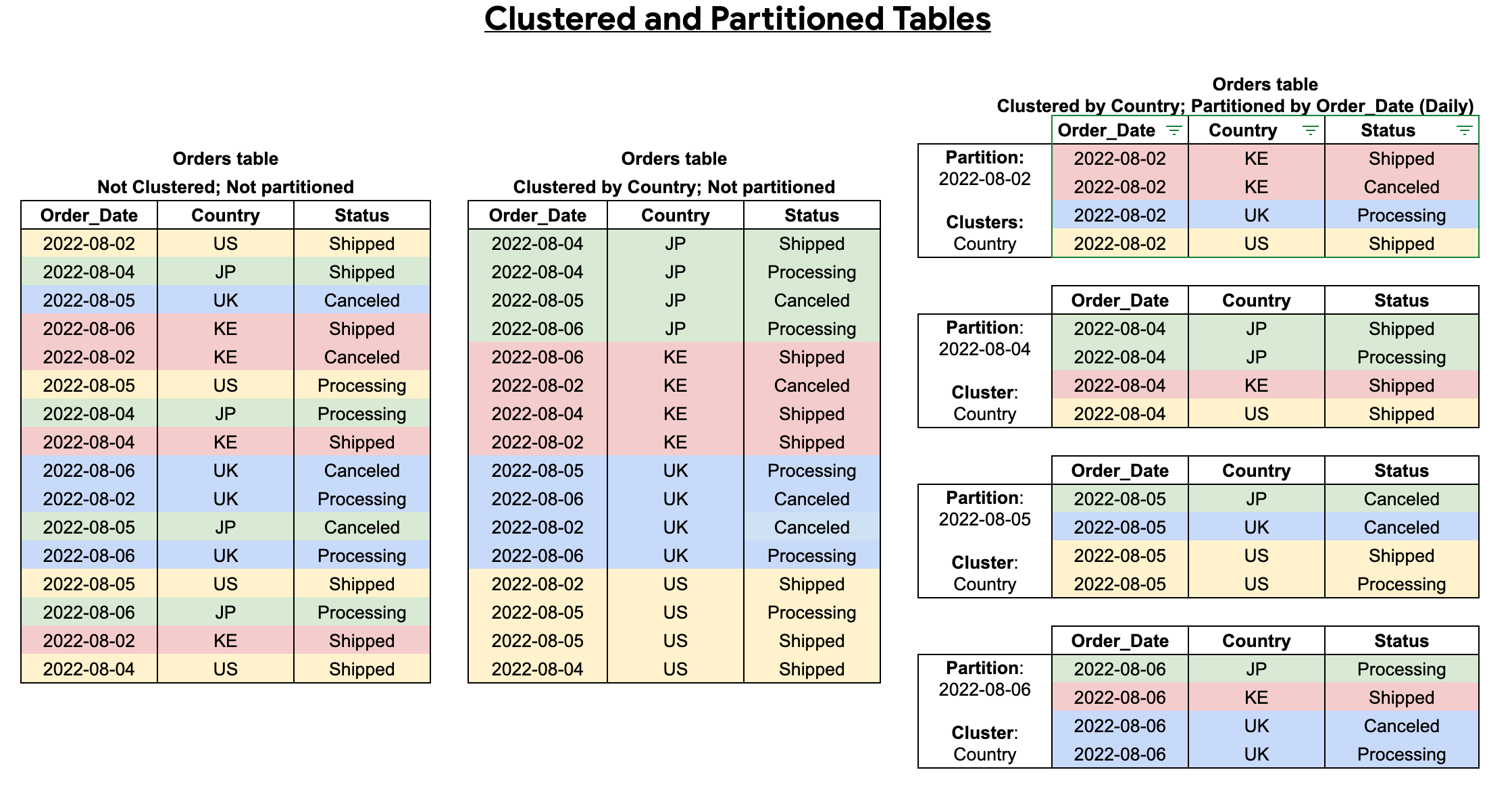
A partition predicate narrows the partitions considered. Filters on clustering columns can then prune blocks inside them. The example is BigQuery storage; other engines expose different physical units.
File size is a measured target
Choose a file format using record and scan requirements. For analytical Parquet, evaluate compression codec, row-group size and physical file size separately.
A useful experiment for a large object-store batch is to compare 128, 256 and 512 MiB target files on representative readers and update jobs. This is an illustrative test grid. DuckDB’s own guidance covers a broader file-size range, illustrating why one setting should not be treated as a universal Parquet optimum.
MiB means 2^20 bytes and GiB means 2^30 bytes; the earlier GB/day example uses decimal units. Assume a partition contains 64 GiB of compressed output:
| Target file size | Approximate file count |
|---|---|
| 16 MiB | 4,096 |
| 256 MiB | 256 |
| 1 GiB | 64 |
Tiny files increase file opens, metadata work and scheduling. Very large files can increase selective-update rewrite cost. Reader parallelism can also depend on row groups rather than file count alone. Compressed bytes on disk do not predict decompressed operator memory.
These counts assume evenly filled files. Several workers writing each partition, skew and the final partial batch change the actual result. A 2 MiB micro-batch will not become a 256 MiB file merely because a target was configured; later batching or supported compaction must accumulate enough data.
Pruning happens at several levels
Swipe or scroll sideways to read the full diagram.
Eligible date predicates first exclude partitions. Statistics may then exclude files or row groups. The reader fetches required columns for the remaining ranges and applies residual filters.
Statistics help only when they describe useful ranges and the reader uses them. Randomly scattered device IDs can give every file nearly the same minimum and maximum, leaving little to skip. Sorting or clustering can improve those ranges, at a write and maintenance cost.
A predicate being pushed into a scan proves that it reached that reader. Runtime bytes, file counts and row counts establish whether it actually eliminated work. Use the query-plan investigation.
Z-order, liquid clustering and engine compatibility
Z-ordering colocates values across selected columns to improve data skipping. Liquid clustering supports evolving clustering keys and incremental layout maintenance. Current Delta documentation treats liquid clustering as incompatible with table partitioning and Z-ordering; choose a supported layout rather than combining all three.
Databricks recommends liquid clustering for new tables. That platform guidance does not imply identical support or automation in every Delta writer. Verify runtime, table features, maintenance operations and all consuming engines before changing the layout.
After a trial, compare representative scans, update bytes, commit latency, file-count distribution and maintenance cost. Preserve the same output and source coverage. The table-operations reference covers conflict handling and retention-safe cleanup.